computer speed is a great problem for some people who do not have a highly configured computer. But you can speed up your computer in various ways. But to day we will just show you how to speed up your computer by customizing the "Windows System Configuration (msconfig)" utility. This utility allows you to configure your computer.
You know if you run too much program in your computer at a time your computer will be slower. You also know that your computer needs some program to be run. Buy you may not know that all of this program is not necessary for all and always. Microsoft allows you to choose or customize these programs according to your needs. You can turn off that unnecessary program and surely your system's performance will grow up.
You see some icon in the right bottom of your computer. Windows loads some program when it starts. This is called startup program. It takes time to load when the computer starts. As many program you will keep there as much time it will take to load. Its better to uncheck all of them. You can run the program from the program list, it will just increase your systems load. There are also an option named service. You will see too many option is checked there. This also increase your system load. If you customize these two option your system will speed up defenately.
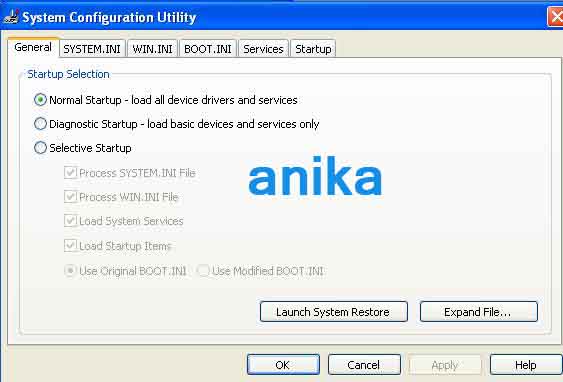
To do this go your start icon and then click on run. Type "msconfig" and click ok. The msconfig utulity will run.

A box will appear titled "system configuration utility" like this.

Go to the startup button. you will see some program will be checked that installed in your computer like this.

Its better to uncheck them all but before that go start button of your computer and then All program. Go to the startup. Some program will appear if it is installed in your computer.
Just drag it to keep with all other program. If you do not do this before unckeck all, this program will be uninstalled. If you do not want to encheck all, no need to do this. In that case you will have to choose according to your necessity. Just keep on apply to save this selection. then go to service to do more. It will be like this.

Now you need to think which one is necessary for you and which one is not. But if you have no idea then click on hide all Microsoft service. Then you will see some un necessary service. uncheck them. But you need to remember that all Microsoft service is not necessary. So you can choose service from there to deselect and not all non-Microsoft service are unnecessary. There may be some service that are important for you. So select them according to your needs.
Apply after finishing and restart your computer. A new box will appear. check it and click on Ok if you want to keep your changes. You will feel the difference of your systems performance.
You know if you run too much program in your computer at a time your computer will be slower. You also know that your computer needs some program to be run. Buy you may not know that all of this program is not necessary for all and always. Microsoft allows you to choose or customize these programs according to your needs. You can turn off that unnecessary program and surely your system's performance will grow up.
You see some icon in the right bottom of your computer. Windows loads some program when it starts. This is called startup program. It takes time to load when the computer starts. As many program you will keep there as much time it will take to load. Its better to uncheck all of them. You can run the program from the program list, it will just increase your systems load. There are also an option named service. You will see too many option is checked there. This also increase your system load. If you customize these two option your system will speed up defenately.
To do this go your start icon and then click on run. Type "msconfig" and click ok. The msconfig utulity will run.

A box will appear titled "system configuration utility" like this.
Go to the startup button. you will see some program will be checked that installed in your computer like this.

Its better to uncheck them all but before that go start button of your computer and then All program. Go to the startup. Some program will appear if it is installed in your computer.
Just drag it to keep with all other program. If you do not do this before unckeck all, this program will be uninstalled. If you do not want to encheck all, no need to do this. In that case you will have to choose according to your necessity. Just keep on apply to save this selection. then go to service to do more. It will be like this.

Now you need to think which one is necessary for you and which one is not. But if you have no idea then click on hide all Microsoft service. Then you will see some un necessary service. uncheck them. But you need to remember that all Microsoft service is not necessary. So you can choose service from there to deselect and not all non-Microsoft service are unnecessary. There may be some service that are important for you. So select them according to your needs.
Apply after finishing and restart your computer. A new box will appear. check it and click on Ok if you want to keep your changes. You will feel the difference of your systems performance.


